EDM can directly access the application database at a site using JDBC or ODBC drivers. It reads and writes to the database directly in response to user editing via EDM forms and transactions coming from headquarters. When the store receives a transaction from headquarters, such as a price change, the database is updated directly. If a user makes a change at the store using the EDM editors, the change is sent to headquarters in a transaction file. To track changes to tables in a store that are not edited by users (such as transaction tables), EDM can take a snapshot of the data at regular intervals and send the changes it detects to headquarters in a transaction file.
EDM maintains a very small database at the store for system data and interacts with the POS and Back Office application databases directly. The system database can be Microsoft Access, Microsoft SQL Server, or Oracle (other ODBC databases may be supported). At headquarters, EDM maintains system data as well as data collected from the stores in a central database which does not have to be the same as the store database. We recommend using Microsoft SQL Server as the size of the database is many times larger than a single store database.
When you use an EDM form to change data in the central database, such as a price, the old and new price record is written in a numbered XML file which is placed in an outgoing directory on the central system. The user supplies the communication software, such as RemoteWare, to physically move the file to the incoming directory at the store. The communication process can be scheduled to run once per day or more often if the data changes are more time sensitive.
EDM supports transmitting transaction files and other files to an EDM web server, an FTP server, or over the local area network. Users can also use their existing communication systems such as RemoteWare to transfer transaction files.
Data changes made at the store using EDM forms are sent to headquarters in transaction files. Other changes can be sent to headquarters by either sending entire tables, sending a selected group of records from a table (such as the last 7 days of transactions), or by comparing a previous snapshot of the data with a current snapshot of the data to send just the changes to headquarters. All data is sent in the form of numbered, XML transaction files which are processed at headquarters when they are received so no data is lost if communications fails for a few days.
EDM is a Java program to make it compatible with any OS that supports Java. The installation at a remote location includes installing a Java runtime environment and the only other software necessary is the ODBC driver to access the store database. The system takes about 20MB of disk space and needs about 40MB of memory when it is running to avoid memory-to-disk swaps which slow the system down. Total memory requirements depend on the other software running on the system. EDM only runs when transactions are being processed or when the user in the store wants to use an EDM form to make data changes. It does not use any memory when not running.
At headquarters, the server needs a database server big enough to handle the data from all the stores, the EDM software, which includes the Java runtime environment, and ODBC drivers to access the database server. We recommend using Microsoft SQL Server on a system with fast disk drives, 10MB of free disk space per store, and 4GB of memory. More memory on the database server will be the biggest factor in improving performance as most database servers cache results in memory.
EDM can be run from inside a PC Anywhere session just like any other program. It will not interfere with PC Anywhere or any other communication software because it does not contain any communication software itself.
At remote locations, EDM typically only runs once a day during the end-of-day processing to process incoming transactions and send updates to headquarters. If the users at the remote location are allowed to make data changes using the EDM forms, then they will have to run the program to use the forms.
Typically, the EDM transaction processing is run from the command line as part of the end of day procedures. It could also be started from a scheduler or event manager or by the communications program itself. All EDM functions are available from the command line. See C:\EdmWeb\process.bat or C:\EdmWeb\transfer_web.bat for examples.
Whenever there is a primary key error on CDMAudit, it means that an incoming transaction file has a transaction in it with the same transaction id as one that is already in the audit trail. Usually this is caused by accidently sending the same transaction file to the stores twice or by restoring a backup of the central database so that it thinks the next transaction number is one that has actually already been used.
To solve the problem, delete the transaction file that won't process and increment the received transaction file number in CDMLocation.RCVDTFN at the store. Then send a table refresh from central to the store to get all the data back in synch.
When the user starts to commit and the message about the Audit trail being locked comes up, it is because the audit trail is locked. This is supposed to happen if another user is committing transactions already to avoid the problem of double-committing transactions. Sometimes, the lock record is incorrectly left in the CDMAudit table because the Apache Tomcat service was restarted while someone was committing transactions. The correct procedure for handling the situation is:
Check to see if other users are currently committing transactions, if they are, simply wait for their commit process to finish.
If not, ask them to not commit until you have unlocked the audit trail.
Manually unlock the audit trail by clicking on Application Objects - Tables - CDMAudit and deleting the row with the -1 in the ID column.
Caution should be used when manually deleting the lock record because if other users are actually committing transactions then you risk having some transactions committed twice.
After waiting for the other commit process to finish, or, if necessary, manually deleting the lock record, the transaction commit process should run without the lock error.
When the user starts a process, such as “Commit Transactions” or “Process Transactions”, and the 'already locked' message comes up, it is because the system believes that another user is currently running the same process and it will not allow two users to run that process at the same time to avoid errors. If the system is in error, and no other users are currently running that process then you can manually unlock the process by taking the following steps:
Check to see if other users are currently running the process, if they are, simply wait for their process to finish.
If not, ask them to wait until you have unlocked the process.
Manually unlock the process by clicking on Application Objects - Tables - CDMValue and deleting the row with a negative number in the VALUEID column and the process name, such as “Commit Transactions” or “Process Transactions”, in the COMMENTS column.
Caution should be used when manually unlocking processes because if other users are actually running the locked process then you risk having duplicate processing errors.
After waiting for the other process to finish, or, if necessary, manually deleting the lock record, the process should run without the lock error.
This problem is cause by the “Last used transaction id” value in the CDMValue table getting set to the wrong value. A database administrator can take the following steps to correct the error:
First, find the highest used transaction number as follows:
Left-click on Application Objects on the EDM main menu
Right-click on Queries and select New
Double-click CDMAudit+ and click Close
Double-click FromLoc and Id in the list of fields in the top half of the window.
Enter a zero (0) in the condition row under the FromLoc column
Left-click the sigma tool (sideways M) to make it a Totals Query.
Left-click in the Totals row under the Id column, open the list and select Maximum
Left-click the Display As Spreadsheet tool (first tool on the toolbar)
Note the value in the Id column
Close the query and save it as "Highest Transaction Id"
Then, update the last used transaction number as follows:
Right-click on Queries (beneath Application Objects on the EDM menu) and select New
Double-click CDMValue+ and click Close
Double-click VALUEID and VALUE in the list of fields in the top half of the window.
Enter a one (1) in the condition row under the FromLoc column
Select Query - Update from the window menu and click OK on the Query Attributes dialog to make it an update query.
In the "Update To" row under the VALUE field, enter the highest transaction id found above plus 100. For example, if the highest transaction id is 891, enter 991 in the "Update To" row under VALUE.
Left-click the Run tool (exclamation point)
Close the query without saving it.
If the duplicate error still occur
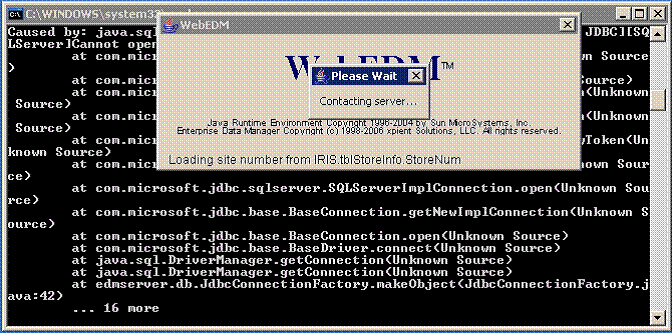
Usually this behavior is caused by the system failing to connect to the database server. If you are using the default installation and connecting to a SQL Server database this could have several causes.
Cause 1: SQL Server is not installed.
Resolution: Install the database server.
Cause 2: SQL Server is set up to use Windows authentication instead of SQL Server authentication.
Resolution: Modify the SQL Server properties to allow Windows and SQL Server authentication as required by the JDBC driver.
Cause 3: SQL Server's “sa” user has a password set instead of a blank password.
Resolution: Either change EDM's config.xml file to contain the correct password for the database server or change the “sa” user's password to blank in SQL Server.
Copy MSVCR71.dll from the C:\Windows\SysWOW64 folder on another Win64 system to C:/Windows/SysWOW64 on the server running Tomcat to stop the error from occurring.
Open the control panel and select 'Add or Remove Programs'. Select 'Add or Remove Windows Components'. Select 'Internet Explorer Enhanced Secutity Configuration' in the list of Windows components and click the 'Details' button. Uncheck the box for 'For administrator groups' or 'For all user groups' as appropriate and click 'OK'.
The Bulk Insert capability of EDM uses a SQL Server script that depends on being able to write multiple records to a file and then insert all of them with one statement. On some systems, the default file location does not work and the administrator needs to tell EDM which directory the files should be written to on the SQL Server PC. To do this, add a line like the following to the config.xml file with a valid path for SQL Server to place the temporary files:
bulkInsertFilePath="C:\temp\"